Hi there.
After some inquiries we finally added the possibility to customize the Apdev VideoPlayer – only changing colors at this time but it’s a first step in the right direction …
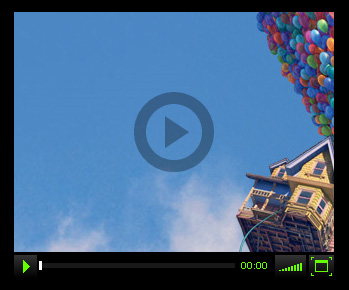
You can now change any color of any object/control that is used within the videoplayer – but check the ApdevVideoPlayerDefaultStyle.as for all the attributes that can be manipulated. And it’s up to you whether you change the attributes using pure ActionScript (1) or our html-version of the videoplayer and pass the values in via flashvars (2). With approach 2 you don’t even have to know ActionScript or open a flash-file – just embed the videoplayer-swf into your website and customize it via flashvars.
For further information, see the upcoming examples.
(1) If you want to use the VideoPlayer in a pure ActionScript project, you can create a new Styles-Object, set all the values you want to change. This object must then be passed into the constructor of the ApdevVideoPlayer and voilà … you got your own custom player.
Create your own Styles-object
package com.apdevblog.examples.style
{
    import com.apdevblog.ui.video.style.ApdevVideoPlayerDefaultStyle;

    /**
     * Custom style-sheet for a custom VideoPlayer.
     */
    public class CustomStyleExample extends ApdevVideoPlayerDefaultStyle
    {
        /**
         * constructor.
         */
        public function CustomStyleExample()
        {
            // player
            bgGradient1 = 0x333333;
            bgGradient2 = 0x000000;
            //
            controlsBgAlpha = 1.0;
            //
            btnGradient1 = 0x333333;
            btnGradient2 = 0x000000;
            btnIcon = 0x66ff00;
            btnRollOverGlowAlpha = 0.2;
            //
            timerUp = 0x66ff00;
            timerDown = 0x999999;
            //
            barBg = 0x333333;
            barBgAlpha = 0.5;
            barLoading = 0x333333;
            barPlaying = 0x66ff00;
            //
            playIcon = 0x000000;
            //
            controlsPaddingLeft = 0;
            controlsPaddingRight = 0;
        }
    }
}
Then pass it into the ApdevVideoplayer-constructor:
// create own style
var style:CustomStyleExample = new CustomStyleExample();

// create videoplayer
var video:ApdevVideoPlayer = new ApdevVideoPlayer(320, 240, style);

// position videoplayer on stage
video.x = 25;
video.y = 25;
// add videoplayer to stage
addChild(video);
… and you’re all done.
(2) Second alternative: You can grab the html-version of our videoplayer from google code and adjust the .html file – no flash/actionscript needed.
// ...

<script type="text/javascript" src="js/swfobject.js"></script>
<script type="text/javascript">
    // <![CDATA[

    var width = 380;
    var height = 240;
    var movie = "htmlvideo.swf";

    // ...

    var flashvars = {};

    // video + img info
    flashvars.v = "video01.mp4";
    flashvars.img = "videostill.jpg";

    // STYLES
    flashvars.playIcon = "#ff0000";
    flashvars.controlsBg = "#ff00ff";
    flashvars.controlsBgAlpha = 1.0;

    // ...

    swfobject.embedSWF(movie, replaceDiv, width, height, flashVersion, express, flashvars, params, attributes);

  // ]]>
</script>

// ...
Sooo … there is no reason why you shouldn’t be already using our VideoPlayer :D
Check it out.
Or take a look at the docs first and then download the whole package.
Enough for now … but keep the feedback coming, we’re still eager to improve the player over time.
Cheers.