Post by Phil / December 22nd, 2009

First real life Flash/Indexhibit website

Hi there … it’s been a bit quiet here over the last month, but only because we had loads of work to do before christmas.
I just wanted to let you know, that we built our first real life Flash/Indexhibit website a few weeks ago – for a good friend who’s a photographer.
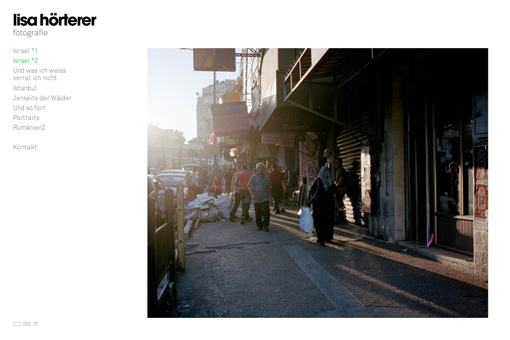
lisa hörterer

We took the example we posted earlier and made some minor changes here and there while focusing on the presentation of the photographs.
There is a slideshow-feature, thumbnails, paging and fullscreen view of the photographs. And we put together a little script adjusting the size of the images to the browser-window without losing quality.

Take a look and maybe it’s kind of a motivation for you to go and try our Flash/Indexhibit code-base for yourself!?

website: www.lisahoerterer.de

whole thing is based on: indexhibit

cheers + and of course a merry christmas
phil

16 Comments

  1. pekasDecember 27th, 2009 / 15:51 / #885

    Looks realy cool. Great job looking forward to try flash/indexhibit

  2. GBJanuary 6th, 2010 / 01:11 / #927

    That is awesome! So we can build this ourselves using flash/indexhibit? Or will it require extensive custom coding to produce a site such as this? I love the simplicity of this site and with the flash integration it is perfect for my requirements. Is it possible to download this template?

    Thankyou!

    GB

  3. andreaJanuary 27th, 2010 / 17:42 / #986

    congratulations…! it’s really usefull
    but..where it’s possible to download the template the themplate..?

  4. UliJanuary 30th, 2010 / 20:51 / #998

    What is the benefit of using Flash here? For the custom font? For the Fading? I don’t get it

  5. PhilJanuary 31st, 2010 / 14:00 / #1001

    hi uli,
    the biggest benefit is, that i can resize the pictures seamlessly. you only have to upload one picture for users with totally different screen resolution because flash can easily resample the images.

    asides from that, i’m a flash developer – not a html/javascript guy, so i do what i do best: flash :) and it took me like 3 hours to finish the first version of the site … with some minor adjustments later.

    cheers

  6. MarinoFebruary 7th, 2010 / 05:11 / #1010

    It looks good but it takes forever to load. It takes 30 sec to go from one picture to the next. Is it me, the server or the flash?
    I didn’t have a speed issue with the first example flash indexhibit site .

  7. TomasFebruary 15th, 2010 / 00:13 / #1014

    Yes, I don’t see any point doing this website in flash. There is no any single tool that does something better then default Indexibit options. Not impressed at all. Sorry I like flash but I think it should be used with for the right purpose.

  8. KarlFebruary 22nd, 2010 / 14:04 / #1018

    There’s already a flash site around. So your’s might not be the very, very first.

    lichtreflektion.de

    Anyways, I very much apprechiate your work! ()Don’t get me wrong

  9. SpencerMarch 16th, 2010 / 05:22 / #1032

    It looks great! And Tomas, the default IndexExhibit can’t resize images as such. You could also possibly have Flash preload the images.

  10. A. A.May 29th, 2010 / 02:21 / #1149

    very nice job!!
    I used your php libraries in this personal ( non commercial ) portfolio http://www.cadaunoescomoes.com and I’ll use it a lot in future.

    Just a tip, I added a “sec_order” field to ExhibitVo class to store section order.. and used “order” to save the gallery order inside a section, so I can detect gallery order modifications and reflect it in flash frontend.

    thanks for the good work!

  11. PhilJune 1st, 2010 / 08:50 / #1161

    hi a.a.
    really like what you have done with our example!
    thumbs up :)

  12. bernardoDecember 28th, 2010 / 15:13 / #1508

    hello, congratulations, flash+indexhibit is a very useful and inteligent solution,
    works with flash video ?

    thanks!

  13. PhilDecember 30th, 2010 / 09:55 / #1510

    hi bernardo,
    no – not out of the box. but if you’re an actionscript programmer you could easily create one or two classes that’ll load and display the video.

    you would use some kind of meta-tag inside the normal textfield and parse the data that is passed to flash via AMF – if there is a [video url="xxxxxx"] you display a videoplayer on the site … that’s it.

    phil

  14. javierFebruary 5th, 2011 / 00:11 / #1523

    Hi Phil,

    First off all, thanks for such a god job you did here.

    Although I am new to Indexhibit I am working to get a similar solution as you got with the Flash Indexhibit Front End but for HTML5 (so to use canvas).

    My objective is to first create an XML file with all the info from every Exhibit in de DB (done using some of the Flash Indexhibit front end files right now).

    Now I have to get to get the XML file updated every time an Exhibit is published/edited. Some help needed here, please any ideas how to “hook” an action to this via a plugin would be very welcome (can that be achieved via plugin?)

    After that we need to somehow change the hole presentation of the site. I am still studing the Flash Frontend code to find out how you did it.

    Would somebody else be interested in this kind of plugin?

    Any advice in the hole thing would be very welcome as I am new to the Indexhibit CMS and I may be not understanding some key aspects of the system right.

    Thanks a lot in advance.
    Javier.

  15. PhilFebruary 9th, 2011 / 08:45 / #1529

    hi javier,
    the easiest way to accomplish something you’re describing would be a dynamic xml output via php/mysql. not as a plugin or anything like that – just a plain php file that reads the database and outputs everything as XML (or JSON if you prefer that).

    cheers
    phil

  16. javierFebruary 15th, 2011 / 09:47 / #1530

    Hi Phil,

    Thanks a lot for your feedback, I can see from your answer that the that the plugin solution is not desirable, is that because of the poor Indexhibit plugin support? I would say average users would normally prefer an easy to use plugin solution.

    Thanks a lot.
    Javier.

    PS: I am more a WordPress developer so maybe I am a little bit confused with the plugin’s meaning here in the Indexhibit world.

Post a comment