Post by Phil / October 21st, 2009

ActionScript Spellchecker for Flash Textfields (with source code and example)

Finally I had the time to add the missing features to our Spellchecker class v01.
You can now right-click the misspelled words and get suggestions from the loaded dictionary in the context-menu.
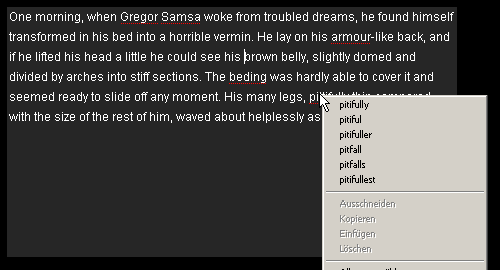
apdev spellchecker

Version 2 also improves the performance when checking really long textfields because we only check the visible part of the text. So as long as your textfield doesn’t have 3000 visible lines of text, it’ll work just fine.

So again, this is ActionScript-only spellchecking for FlashPlayer 9. No Flex required (compared to Adobe’s version).

The Apdev Spellchecker is built on top of Adobe’s “Squiggly“, which they released earlier.

Get our class here: ApdevSpellChecker.as
And the required classes from Adobe here: http://labs.adobe.com/downloads/squiggly.html

*Small update* Example for TextField in Flash CS4:
apdev-spellchecker-example-cs4.zip

Hope this helps anybody …

Cheers

6 Trackbacks

16 Comments

  1. Steve KudirkaOctober 21st, 2009 / 17:06 / #774

    Hey man great job on this. When I first tried it I couldn’t get it to work. Then I removed the “true” values to the “useWeakReference” parameters in your event listeners. That worked. Has caused problems for me in the past with other projects. Depends on the OS, but I have seen listeners get removed with a weak reference. So I have avoided it. I would also include a destroy() method to clear out all listeners, timers, and objects to dispose of the instance. Again, great work and a very useful class.

  2. PhilOctober 21st, 2009 / 21:50 / #776

    hi steve.
    thanks for the tip – never had these problems before. but will definitely look into this.
    could you tell me more about the setup you had while experiencing the problems? or even send me a file so i could take a look.

    and thanks for the feedback, really appreciate it :)

  3. BruceOctober 22nd, 2009 / 08:55 / #778

    There are some people on the Adobe forums looking for something like this.
    Do you want to let them know about it?

    http://forums.adobe.com/message/2331150?tstart=0#2331150

  4. PhilOctober 22nd, 2009 / 10:45 / #779

    hey bruce … thanks for letting us know. just posted a reply :)

  5. PhilOctober 23rd, 2009 / 09:35 / #781

    over at the adobe forums Xie Fang pointed me in the right direction regarding the events i was missing. (complained about it before – sorry for that…).
    i updated the apdev spellchecker class to use the COMPLETE event instead of creating an enterframe-listener which checks whether or not the dictionary’s isLoaded variable is set to true.

    get v0.21 here: http://apdevblog.com/examples/apdev_spellchecker/src/ApdevSpellChecker.as

    cheers
    phil

  6. MDBDecember 16th, 2009 / 05:53 / #870

    This is great, and its exactly what I’m looking for, however my flash knowledge is limited.

    Would you be so kind as to point me in the right direction for implementing something like this into my website (spell checking on text areas)

    I know a little flash, but I’m not so schooled in on the packages and how to include them

    thanks very much

  7. PhilDecember 22nd, 2009 / 16:06 / #875

    hi MDB,
    i put together a little flash cs4 example for you – maybe this will help you to better understand how the spellchecker works!?
    here is the link to the example download:
    http://apdevblog.com/examples/apdev_spellchecker/apdev-spellchecker-example-cs4.zip

    cheers, phil

  8. Dan ZenJanuary 1st, 2010 / 19:54 / #905

    Hi Phil,

    It looks like Adobe is no longer distributing the

    com.adobe.linguistics.spelling.SpellChecker;
    com.adobe.linguistics.spelling.SpellingDictionary;

    classes in their squiggly download – you would not happen to have them – you are probably not supposed to post them but perhaps you could send them to me…

    Thanks.

  9. PhilJanuary 2nd, 2010 / 10:49 / #910

    hi dan.
    adobe now supplies a *.swc file containing all the classes you need. in the current release it is called AdobeSpellingEngine.swc. you have to add this file to the “classpath” in flash (more info about external libraries in flash here: help.adobe.com).

    hope this helps.
    cheers
    phil

  10. Philip Rodrigues SingerApril 22nd, 2010 / 14:51 / #1059

    OK, I have set the External Library Path to include the AdobeSpellingEngine.swc BUT I get an error “VerifyError: Error #1014: Class com.adobe.linguistics.spelling::SpellingDictionary could not be found.” The “ApdevSpellChecker.as” file has reference to “import com.adobe.linguistics.spelling.SpellChecker;” which it cannot seem to find…

    Please help – your solution is brilliant but I just can’t seem to make it Publish on my end…

  11. Philip Rodrigues SingerApril 22nd, 2010 / 15:12 / #1060

    Figured out that with the newest Squigly package there are several .swc’s now and I included all three and that did the trick – however – now there are several new issues – I’m looking into it…

    If you know something I don’t I’d love to find out – thanks much

  12. PhilApril 22nd, 2010 / 15:35 / #1062

    hi philip,
    if you download the apdev-spellchecker-example-cs4.zip (link above) you’ll find the “old” adobe-swc inside. this is the one i tested our class with – so everything should work perfectly.
    don’t exactly know what adobe change with the new pre-release, but seemed already pretty good with the older version …
    cheers,
    phil

  13. Philip Rodrigues SingerApril 22nd, 2010 / 15:47 / #1064

    I am emailing you a quick screen cap – PLEASE – I hope you don’t mind an email – thank you.

  14. PhilApril 22nd, 2010 / 16:07 / #1065

    if you’re are getting the error mentioned above

    VerifyError: Error #1014: Class com.adobe.linguistics.spelling::
    SpellingDictionary could not be found.

    try readding the SWC file to your library path. maybe there is still the absolute path from my dev-folder in there somewhere :(

  15. Philip Rodrigues SingerApril 22nd, 2010 / 16:23 / #1066

    YES THAT WAS IT – IT WORKS!!!!!!

    Now – question – may I please include this code in an Open Source project I working on?

    Thanks so much really!

  16. PhilApril 22nd, 2010 / 16:27 / #1067

    you’re very welcome.

    you can use our classes in any project you like – as long as you keep the copyright note at the top of the class where it is :)

    cheers

Post a comment